
Migrating to Jira Cloud means taking on a major change process. However, the real challenge usually begins in the teams' day-to-day work: the user experience. Suddenly changing the interface and working dynamics makes many users feel lost, reducing platform adoption and generating frustration.
To solve this problem and simplify daily management, at Quabu we have updated the app Visual Organizer for Jira Cloud with two new tabs designed to streamline work without complications: Issues and Summary.
1. "Issues" tab: Centralize all your work at a glance
Searching for tickets spread across different boards or projects usually costs valuable productive time. With the new Issues tab, users get a unified command center with three key views:

- My Assigned Issues: Direct access to all the tasks assigned to you.
- My Reported Issues: Control and track the tickets you have created.
- My Watched Issues: View the tasks you are supervising as a watcher.
It also lets you quickly filter by status (Open, In Progress, Done) and by project or space, making it easy to jump straight to each ticket's details.
2. "Summary" tab: An actionable dashboard without complex filters
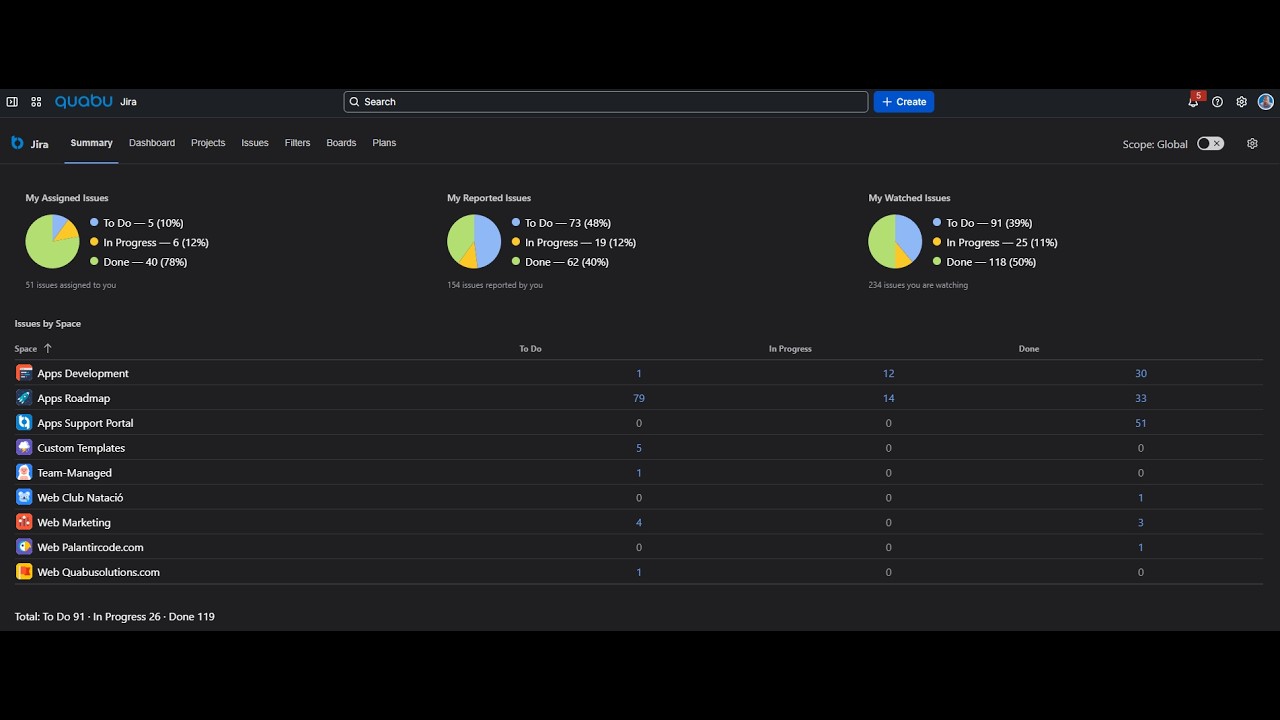
Keeping projects clean in Jira usually requires manually creating JQL filters, gadgets and custom dashboards. The Summary tab removes this administrative work with an interactive, ready-to-use panel:

- Visual work distribution: Intuitive charts breaking down the status of assigned, reported and watched work.
- Bottleneck detection: Analysis by project (Issues by Space) to investigate why some tickets stay open for too long.
- Immediate cleanup: Audit and tidy up project tasks without configuring extra dashboards.
Key benefits for teams
- Reduced adoption gap: A structured interface minimizes the impact of change after migrating to Jira Cloud.
- Time savings: Avoids the constant management of individual filters and boards.
- Flexible customization: Configure the default tab when opening the app and organize boards, projects or filters using colored labels and categories.
Simplify your team's management in Jira Cloud
Don't let the members of your organization get lost in the platform. With the new features of Visual Organizer for Jira Cloud, keeping control of your work and the health of your projects is easier than ever.
Watch the app in action
🎬 Visual Organizer for Jira Cloud — demo video
#Jira #JiraCloud #Atlassian #VisualOrganizer #Adoption #Productivity #QuabuSolutions