At Quabu, we continue to listen actively to our community and work to make your day-to-day experience with Atlassian more efficient. Thanks to the enthusiastic reception of Custom Templates for Jira Cloud on the Atlassian Marketplace, this week we have released an update packed with improvements highly requested by our customers.
In this new version (v2.2.1), we have focused on taking Comment Templates to the next level, giving them greater flexibility, personalization and automation.
Here is everything you can now do with this update.
1. Global and User Templates: Greater Autonomy for the Whole Team
Until now, only Jira administrators had permission to create and manage comment templates. We understand that each team member has their own communication routines, so we have split templates into two levels:
- Global Templates: Created by administrators to standardize official responses or common processes across the organization.
- User Templates: Any user can now create, edit and manage their own personal templates to speed up recurring responses without relying on an administrator.
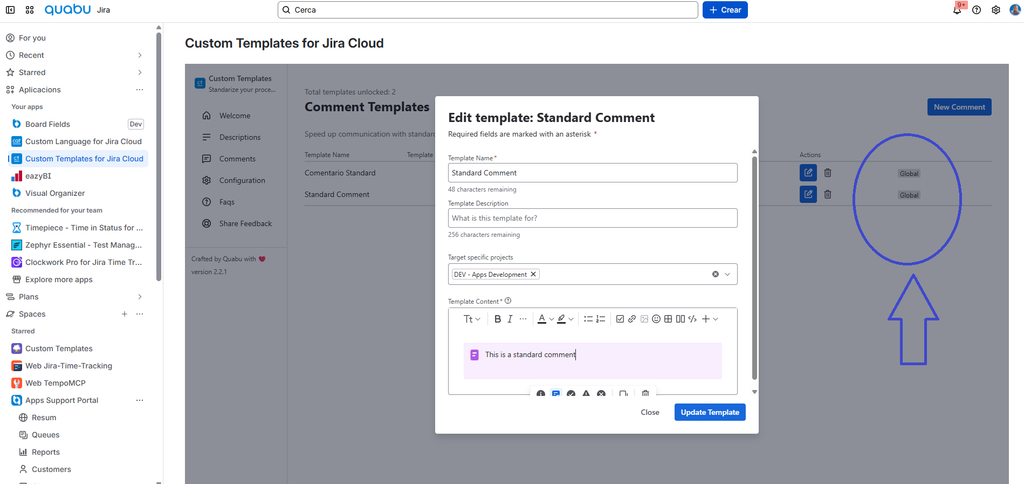
Template configuration view showing the Global scope and the editing of standard comments.
2. Restrict Templates to Specific Projects
As the number of templates in a Jira instance grows, keeping things organized is essential to avoid overwhelming teams with irrelevant options.
With the new Target specific projects option, you can now decide exactly which projects each comment template will be available in. This means the support team will only see its customer service canned responses, while development teams will have their own technical templates at hand.
3. Dynamic Variables That Fill Themselves In Automatically
This is undoubtedly one of the standout features of this release. You no longer have to manually edit key details every time you use a template: we have introduced smart variables that retrieve information directly from the issue in real time.
The available variables you can include in the body of your templates include:
{{currentUser}}: The user writing the comment.{{issueKey}}and{{issueSummary}}: The issue key and summary.{{issueAssignee}}and{{issueReporter}}: The assignee and reporter.{{issueResolution}}and{{requestStatus}}: The resolution and the current request status.{{requestUrl}}and{{portalUrl}}: Direct links to the request and the customer portal.
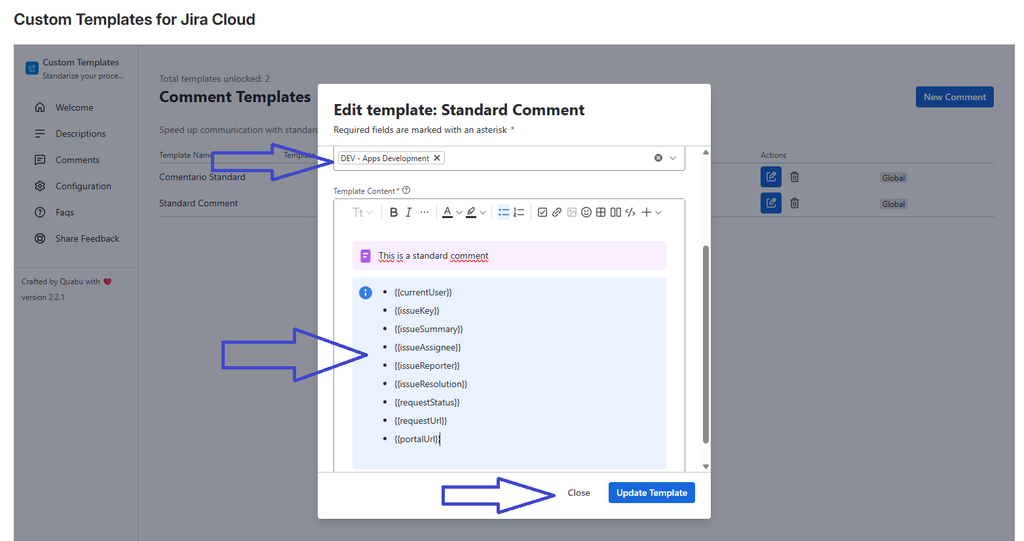
Project filter configuration and the list of dynamic variables available within the template editor.
What Does It Look Like in Action Inside an Issue?
The workflow remains just as simple and intuitive for users, but much more powerful. When you open any Jira issue and select the Comment Templates tab in the activity section, simply choose the template you want from the dropdown.
The editor will automatically load the rich-text format with all variables already resolved using that issue's actual data (user, key, assignee, status and more), ready to publish with a single click on Add Template as Comment.
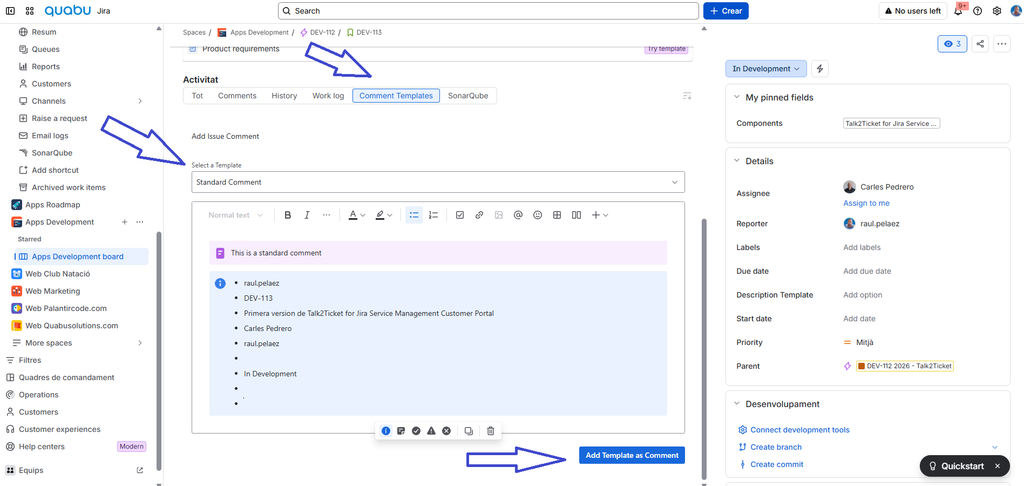
A real example of a template applied to an issue with its variables filled in automatically.
Start Saving Time in Jira Cloud Today
If you already have the app installed on your instance, these new features are automatically available to you. If you have not yet tried standardizing and accelerating your teams' communication, we invite you to discover it for free.
Try Custom Templates for Jira Cloud on the Atlassian Marketplace
Do you have a suggestion or a use case you would like to see in future versions? Leave us a comment or get in touch with the Quabu team!